Difference between laravel and codeigniter


Yeah of course both languages are doing good. we have some advantages and the disadvantages too. It also need look based on the requirements from the user and satisfication. condeigniter has the version 3 and laravel 5.4 versions. It just goes on with the updates and features. Any how some differences should be down here!.

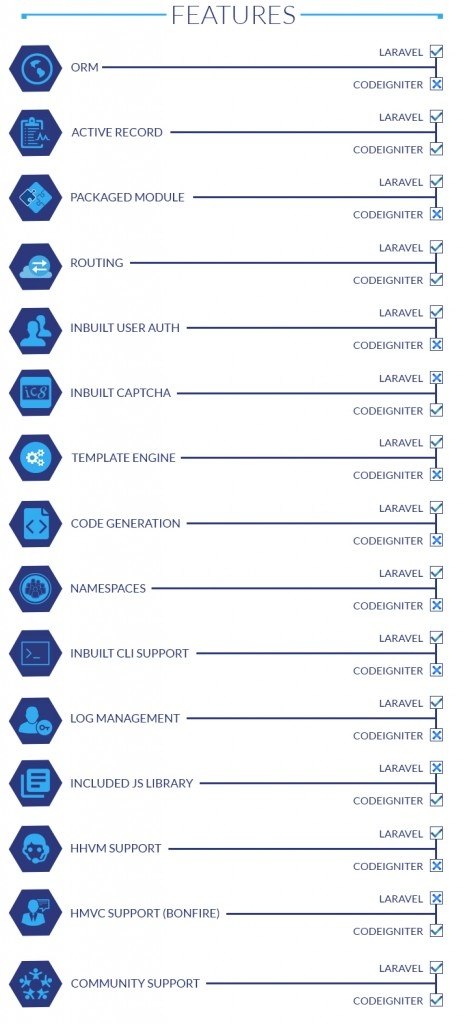
The difference between laravel and codeigniter features

                                                    LARAVEL CODEIGNITER
1. ORM(Object Relational Mapper) -  yes                   -
2. Active record -  Yes                 Yes
3. Packaged module                            -  yes                 -
4. Routing                                   -  yes                  Yes
5. Inbuild user auth                        -  yes                  -
6. Inbuild captcha -   -                  yes
7. Template engine -   yes                -
8. Code generation -  yes                -
9. Namespaces                             - yes                 -
10. Inbuild cli Support(Command-line)  -  yes            -
11. Memory Recommanded -  1GB 256MB

------------------------------------------------------------------------------------------------

Comments

Popular posts from this blog

Create a Plugin in the in Windows for Processmaker 3.0

**************************************************************************   To Create a Plugin in the in Windows for Processmaker ************************************************************************** Now let us create the plugin using windows os for the processmaker. The main Steps to Plugins cannot be created on Windows servers, because Windows does not support symbolic links; however, there is an experimental script for Windows servers available at <INSTALL-DIRECTORY>/workflow/engine/gulliver-win.bat which can be tested. http://wiki.processmaker.com/3.0/Plugin_Development The steps given below as a step by step please follow this any query just post commands. Step :1 ============ C:\Bitnami\processmaker-3.1-1\apps\processmaker\htdocs\workflow\engine>gulliver-win.bat new-plugin deleteCases using DSN Connection The plugin deleteCases exists in this file C:\Bitnami\processmaker-3.1-1\apps\pr ocessmaker\htdocs\workflow\engine\plugins\deleteCases\class.delet...

Add footer page number in Microsoft (Word) using PHP

Here is an example of adding a footer page number in a word document( .docx, .doc ) using PHP in ProcessMaker tool.  Sometimes we would like to add the footer connect via styles or tag attributes to enable the footer on pages.  View:          Below screen the output screen to display the custom footer with few lines of code Example: <table border="0" cellpadding="0" cellspacing="0" id="test" style="width: 100%;"> <tbody> <tr> <td> <!--footer starts--> <div id="f1" style="position: fixed; bottom: 5mm; left: 0mm; width: 100%; mso-element: footer;"> <table border="0" cellpadding="0" cellspacing="0" style="width: 100%;"> <tbody> <tr> <td class="footer"> ...

vagrant up not working windows 10 | Stderr: VBoxManage.exe: error: Failed to get device handle and/or partition

 vagrant up not working windows 10 If you get an error message during  vagrant up  or when starting a VirtualBox machine, telling you that VT-x is not available, a reason may be that you have enabled Hyper-V on your Windows 10 machine: VirtualBox and Hyper-V cannot share the VT-x CPU: $ vagrant up Bringing machine 'default' up with 'virtualbox' provider... ==> default: Checking if box 'thesteve0/openshift-origin' is up to date... ==> default: Clearing any previously set network interfaces... ==> default: Preparing network interfaces based on configuration... default: Adapter 1: nat default: Adapter 2: hostonly ==> default: Forwarding ports... default: 8443 (guest) => 8443 (host) (adapter 1) default: 22 (guest) => 2222 (host) (adapter 1) ==> default: Running 'pre-boot' VM customizations... ==> default: Booting VM... There was an error while executing `VBoxManage`, a CLI used by Vagrant for controlling VirtualBox. The command an...